


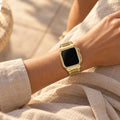


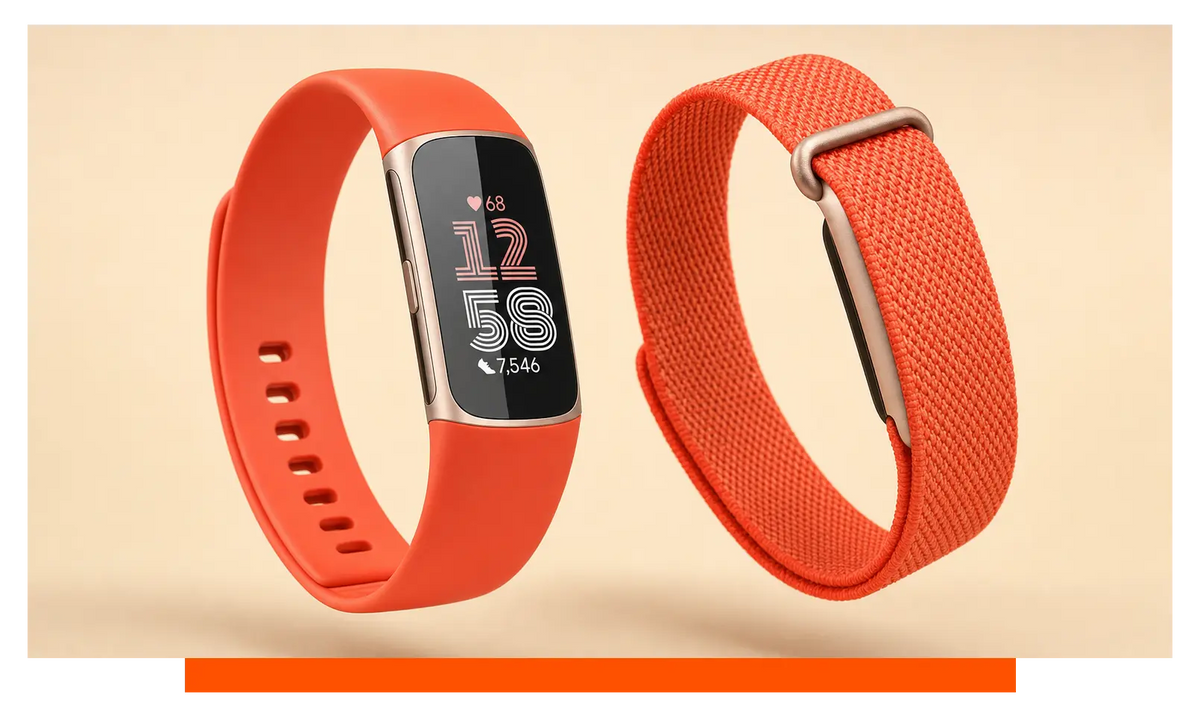
Choose Fitbit Charge 6 if you want live workout information, wrist controls and phone-free route tracking. Choose Fitbit Air if quiet all-day and sleep wear matters more than seeing or starting everything on your wrist. The deciding factor is simple: whether a screen helps your routine or gets in its way.
The short version
Fitbit Charge 6 is the more capable choice on your wrist, while Fitbit Air deliberately moves attention away from your wrist and into the app.
- Choose Fitbit Charge 6 for outdoor training without a phone. Its built-in GPS can record pace, distance and your route while its AMOLED display keeps live information visible.
- Choose Fitbit Air for quiet all-day and overnight tracking. It has no display, weighs 12 g with its band and is designed around reviewing information later.
- Everyday battery life is level. Both are rated for up to 7 days, although Fitbit Charge 6 lasts up to 5 hours when its built-in GPS runs continuously.
- Fitbit Air charges faster on paper. Its quoted charging time is 90 min, against two hours for Fitbit Charge 6.
- Both work with Android and iOS. Your phone choice does not settle this comparison; how much you want to do from your wrist does.
- Fitbit Air costs less. At the time of writing, Fitbit Charge 6 was listed at £139, while Fitbit Air was listed at £84.99.
The choice turns on one trade: Fitbit Charge 6 puts useful information and controls on your wrist, whereas Fitbit Air removes the screen to make tracking less intrusive.
Fitbit Charge 6 and Fitbit Air specifications compared
Fitbit Charge 6 wins on immediate control and phone-free navigation; Fitbit Air trades those abilities for a simpler, screen-free form.
| Specification | Fitbit Charge 6 | Fitbit Air |
|---|---|---|
| Display and controls | AMOLED display | No display |
| GPS and route tracking | Built-in GPS | Phone GPS |
| EDA Scan app | Yes | No |
| Contactless payments | Yes | No |
| Smartphone notifications | Yes | No |
| Google apps | Google Maps; YouTube Music | No |
| Ambient light sensor | Yes | No |
| Price at the time of writing | £139 | £84.99 |
| Battery life | Up to 7 days | Up to 7 days |
| Charging time | Two hours | 90 min |
| Water resistance | 50 metres | 50 metres |
| Heart-rate sensor | Optical heart rate monitor | Optical heart rate monitor |
| SpO2 monitoring | Yes | Yes |
| Skin-temperature sensor | Yes | Yes |
| Accelerometer | 3-axis accelerometer | 3-axis accelerometer |
| Vibration motor | Yes | Yes |
| Platform compatibility | Android; iOS | Android; iOS |
Is the Fitbit Charge 6 screen worth having?
Yes, the Fitbit Charge 6 screen is worth having if you regularly act on information during a workout rather than simply reviewing it afterwards.
The AMOLED display lets you see live pace and distance, start a workout from your wrist and follow turn-by-turn directions. That matters when you are running through an unfamiliar area, checking progress during a ride or trying to avoid repeatedly taking out your phone on a walk.
It also makes Charge 6 useful between workouts. Smartphone notifications appear on the tracker, and its wrist controls give it a role closer to a compact smartwatch. If you commute, train to a target or often leave your phone packed away, the display earns its place.
Fitbit Air takes the opposite approach. There is no screen to light up in bed, pull your attention towards messages or encourage repeated checking during the day. You collect health information quietly and review it in the app when it suits you.
This is not a simple case of a missing feature making Air worse. A screen is only valuable when you want to look at it. If sleep comfort and fewer wrist-based distractions matter more than live statistics, Air’s absence of a display is the point of the product.
On your wrist, you would notice the difference every day: Charge 6 invites quick glances and actions, while Air stays in the background until you open the app.
Fitbit Charge 6 vs Fitbit Air: GPS and route tracking
Fitbit Charge 6 is the clear choice for phone-free runs, rides and hikes because it has built-in GPS; Fitbit Air relies on a nearby phone for location data.
With Charge 6, you can leave your phone behind and still record pace, distance and your route. Its screen then makes that hardware more useful by showing live workout information as you move. Built-in GPS is therefore not an isolated specification - it supports the whole reason to choose the screened tracker.
Continuous use changes the battery calculation. Fitbit Charge 6 is rated for up to 5 hours with its built-in GPS running continuously. That is the practical figure to consider if you plan long walks, extended rides or events where route recording matters from start to finish.
Fitbit Air can still attach location information to outdoor activity, but it does so through connected GPS from your phone. It cannot replace Charge 6 for someone who wants to train outdoors without carrying that phone. If you already run with your handset for music, safety or calls, however, connected GPS may be perfectly adequate.
The choice flips according to what is in your pocket. Regularly leave your phone at home, and Charge 6 solves a real problem; always carry it, and Air’s dependence on phone GPS becomes much less important.
What you would actually notice is freedom: Charge 6 can map an outing by itself, whereas Air and your phone need to travel together.
Fit, comfort and strap choice
Fitbit Air is the more natural fit for unobtrusive sleep and all-day wear, while Fitbit Charge 6 suits people willing to accommodate a screen in exchange for live information.
Fitbit Air weighs 12 g with its band. More important than the number alone is the screen-free shape: there is no display to position for easy reading and no reason to rotate your wrist towards it. That makes it particularly easy to treat as a background health tracker rather than another device asking for attention.
It can also sit alongside a conventional watch when you want health tracking without giving up the timepiece you already enjoy. That arrangement will not suit every wrist, but Air’s small, quiet tracker body makes the idea far more credible than wearing a second display.
Charge 6 needs to be visible and accessible because its screen and controls are central to its value. Fit should therefore keep the display easy to read without making the band uncomfortably tight. During exercise, a secure band helps the optical heart-rate sensor maintain consistent skin contact; overnight, a softer and more forgiving fit may feel better.
Band choice gives both trackers useful flexibility. Silicone, nylon, leather, Milanese and metal options are available among our Fitbit Charge 6 straps. The same five material categories are available among our Fitbit Air straps, so choosing Air does not restrict you to a single sporty look.
The material should follow the job. Silicone is practical around sweat and water, nylon can provide a softer everyday fit, while leather, Milanese and metal can help either tracker sit more naturally with work clothes. Switching bands can also separate training use from overnight wear without changing the tracker itself.
The felt difference is less about fashion than presence: Air can fade into your routine, whereas Charge 6 remains a small interactive device that you intentionally look at.
Fitbit Charge 6 vs Fitbit Air: battery life
Everyday battery life is a draw at up to 7 days, but Fitbit Air has the shorter quoted charging time and Charge 6 has a separate GPS limit to consider.
For general activity, health and sleep tracking, both trackers can cover the same stated period between charges. That means battery life alone should not push you towards Air simply because it lacks a display, nor towards Charge 6 because it is the more feature-rich device.
The charging difference is clearer. Fitbit Air has a quoted charging time of 90 min, while Fitbit Charge 6 is quoted at two hours. Air is therefore easier to top up during a shorter gap in your day, which is useful if you want to keep wearing it overnight rather than leaving it off your wrist.
Charge 6 introduces another consideration when you use its main outdoor advantage. Continuous built-in GPS reduces its quoted runtime to up to 5 hours. The feature remains valuable, but frequent GPS sessions will naturally bring the charger into your routine more often than ordinary health tracking.
Air avoids that particular drain by using your phone’s GPS hardware. That does not give it independent route recording, but it does mean the tracker itself is not powering a built-in GPS receiver.
In ordinary use, neither has the endurance advantage; you would mainly notice Air returning to your wrist sooner after charging and Charge 6 needing more planning for long GPS-recorded outings.
Health sensors and everyday trends
Both trackers cover the same core sensor categories for everyday heart, sleep and recovery trends, so the screen - not the basic sensor set - is the larger dividing line.
Fitbit Charge 6 and Fitbit Air both include an optical heart-rate monitor, SpO2 monitoring, skin-temperature sensing and a 3-axis accelerometer. Both can track sleep stages, heart rate, resting heart rate, heart-rate variability, skin-temperature variation and SpO2 trends.
That makes Fitbit Air a credible alternative if your priority is collecting health information quietly. You are not abandoning the core activity, sleep and health trends simply because there is no display. You are changing where you inspect them: in the app rather than at your wrist.
Charge 6 is better when seeing information promptly affects what you do. A live display can help during exercise, while its broader set of wrist-based health tools gives people who actively take readings more to work with. Air is aimed more squarely at passive collection.
Neither tracker should be chosen as a substitute for medical advice. Their practical role is spotting patterns, supporting habits and giving you a consistent record to discuss when something changes.
Day to day, the recorded trends can look familiar on either tracker; the difference is whether you want an active health tool on your wrist or a quieter sensor feeding the app.
Stress-checking features
Fitbit Charge 6 is better for deliberate stress checks because it includes the EDA Scan app, which Fitbit Air does not offer.
This is another expression of the same design split. Charge 6 is built for moments when you choose a function and interact with the tracker. Its display gives that process a natural place to begin and lets the device guide you without first reaching for your phone.
Fitbit Air is more passive. It still collects useful health and sleep information, but it is not intended to reproduce every active assessment available on Charge 6. If you rarely open the EDA Scan app, that omission may have little effect on your routine; if the feature is part of how you monitor stress, moving to Air would be a genuine step back.
The practical distinction is intentional use: Charge 6 lets you initiate a stress-related check from the tracker, while Air concentrates on collecting background trends.
Payments and Google apps
Fitbit Charge 6 is considerably more useful away from the health app because it supports contactless payments, Google Maps and YouTube Music; Fitbit Air offers none of them.
Contactless payments can let Charge 6 cover a quick purchase when taking out your phone or wallet is inconvenient. Google Maps adds turn-by-turn directions, which reinforces the value of having a display during a walk or run. YouTube Music controls also keep common playback actions within reach.
Air avoids that smartwatch-style role entirely. It does not try to become a wallet, navigation screen or media remote. This keeps the experience quiet, but it means your phone remains the place where those actions happen.
Ask whether you would actually use the extras. For a commuter who pays from the wrist and follows walking directions, Charge 6 can remove several small interruptions from the day. For someone who already prefers a phone or conventional watch for those jobs, Air loses less than the feature list suggests.
Around town, Charge 6 can replace a few trips to your pocket; Air cannot, and is better understood as a tracker rather than a compact smartwatch.
Notifications, light sensing and vibration
Fitbit Charge 6 is better if you want visible phone alerts, while Fitbit Air is better if avoiding those alerts is part of the appeal.
Charge 6 can show smartphone notifications and has an ambient light sensor to help its display respond to surrounding light. That makes messages and workout information easier to glance at across changing conditions without turning the tracker into a full-sized watch.
Both trackers include a vibration motor, so the absence of a screen does not mean Air is completely unable to get your attention. The experience is simply less visual and less information-heavy. You will use the phone app for the detail that Charge 6 can place directly on your wrist.
This feature can be either a benefit or a distraction. Visible notifications are useful when you need to filter calls or messages without handling your phone. They are less welcome when you are trying to protect sleep, focus or time away from screens.
The everyday effect is attention management: Charge 6 can tell you what is happening at a glance, while Air gives you fewer reasons to break concentration.
Fitbit Charge 6 vs Fitbit Air: water resistance
Water resistance does not decide this comparison because both trackers are rated to 50 metres and are suitable for swimming.
That shared rating makes either model practical for pool sessions, wet-weather walks and the accidental splashes that come with daily wear. It also means choosing the screen-free Air does not require giving up the basic water protection offered by Charge 6.
Your band still matters. A wet band can feel more intrusive than the tracker body, especially overnight, so it is sensible to dry the tracker and band thoroughly after swimming. A water-friendly silicone option is generally easier to manage around regular pool use than a dressier leather or metal band.
In the water, you would not choose between them on resistance; the meaningful difference remains whether you want Charge 6’s display for visible information before and after the session.
Phone compatibility
Phone compatibility is a draw because Fitbit Charge 6 and Fitbit Air both work with Android and iOS.
Your handset therefore does not force the decision in either direction. The more useful question is how dependent you want the tracker to be on that handset. Charge 6 can record an outdoor route using its own GPS and puts more controls on your wrist; Air uses phone GPS and expects you to review detail in the app.
This distinction matters even when both trackers pair successfully. Someone who keeps a phone nearby throughout the day may find Air’s app-led approach easy to live with. Someone who deliberately leaves a phone behind for exercise will get substantially more independence from Charge 6.
Once paired, both support the main phone platforms; what you would notice is Charge 6 doing more when the phone is absent.
Where Fitbit Charge 6 is better
Fitbit Charge 6 is better wherever immediate information, wrist interaction or independence from your phone matters.
- Phone-free routes: built-in GPS records pace, distance and location without a nearby handset.
- Live workout information: the AMOLED display shows useful figures while you are moving.
- On-wrist control: workouts can be started without opening the phone app.
- Navigation: Google Maps provides turn-by-turn directions on the tracker.
- Everyday convenience: contactless payments and smartphone notifications reduce trips to your pocket.
- Active health tools: the EDA Scan app adds a deliberate wrist-based stress check.
Where Fitbit Air is better
Fitbit Air is better when comfort, discretion and low-friction health tracking matter more than wrist controls.
- Unobtrusive wear: it weighs 12 g with its band and has no display competing for attention.
- Sleep-friendly design: there is no wrist screen to illuminate or tempt you into checking alerts in bed.
- Faster quoted charging: 90 min instead of the two hours quoted for Charge 6.
- Lower price: Fitbit Air was listed at £84.99 at the time of writing, against £139 for Fitbit Charge 6.
- Conventional-watch pairing: the small, screen-free body can provide health tracking without replacing your usual timepiece.
- Fewer distractions: health information waits in the app rather than appearing throughout the day.
Who should choose which
Choose according to whether you need the tracker to help during an activity or simply record it for later.
- Choose Fitbit Charge 6 if you run, cycle or hike without your phone and want built-in GPS to capture your pace, distance and route.
- Choose Fitbit Charge 6 if you train to live information and regularly check progress from your wrist.
- Choose Fitbit Charge 6 if you commute and will use notifications, contactless payments or Google Maps.
- Choose Fitbit Charge 6 if active health checks matter and you use features such as the EDA Scan app.
- Choose Fitbit Air if you prioritise sleep and all-day comfort over seeing information immediately.
- Choose Fitbit Air if you always exercise with your phone and are happy for that phone to supply GPS.
- Choose Fitbit Air if you prefer a conventional watch but still want activity, sleep and health trends collected in the background.
- Choose Fitbit Air if wrist-screen distractions bother you and you would rather check the app on your own terms.
In short: Charge 6 is the better tool while you are moving; Air is the easier tracker to forget you are wearing.
Frequently asked questions
These answers cover the remaining practical questions that can affect ownership.
Can either tracker detect signs of irregular heart rhythm?
Yes. Both can send Irregular Rhythm Notifications for possible signs of AFib where the feature is available and the tracker is updated; Charge 6 also has an ECG app for an on-demand assessment.
Can I shower, use a hot tub or visit a sauna with either tracker?
Avoid wearing either tracker in the shower, hot tub or sauna, even though both are suitable for swimming. Dry the tracker and band thoroughly whenever they get wet.
Do I need a subscription for useful sleep and activity tracking?
No. Daily activity, exercise, sleep-stage and health metrics are available without a subscription; the paid service adds advanced insights, coaching and selected fitness features.
Can Fitbit Charge 6 broadcast heart rate to gym equipment?
Yes. If the machine supports the Bluetooth Heart Rate Profile, Charge 6 can share live heart rate with compatible treadmills, ellipticals, rowers and exercise bikes.


